Constant improvements in technology and program code drive the rise in recommended minimum requirements for personal computers. A few years back, 4 GB of RAM was considered a bare minimum necessary to survive on the internet of those days. Nowadays, some IT consultants call for 16 GB of RAM to be the bare minimum to just open a single tab, for a single page, in the browser. That is mostly because of how much memory and processing resources are being taken away just for keeping the idling systems up, not to mention other programs users might be running in the background.
Regardless, a common non-tech-savvy user usually uses their laptop just for that - browsing. Checking e-mail, reading news, daydreaming in social media and maybe once or twice a year they might need a little bit of office-type program involvement. Relatively smooth user experience is desired and quite often at a very affordable price: as long as the laptop is cheap and does not do any hiccups every two seconds, all is fine.
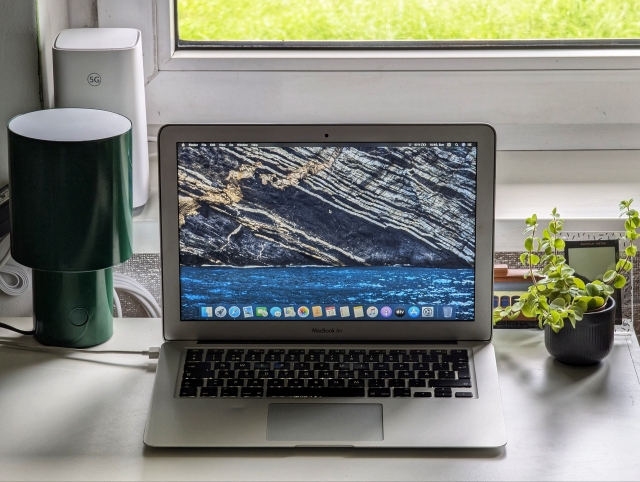
That being said, you might be surprised by how usable a 14 year old MacBook Air from 2011 is even in 2025. Back in the day it was a premium portable machine meant for work, school and leisure; not much of a gaming machine indeed. But, behind that bottom cover of this ultrabook are hidden quite a few interesting things about it. As for the machine that I am talking about (and showing in the picture):
- Specifications include Intel Core i5-2557M, 4 GB of RAM and an expanded 256 GB SSD.
- Processor runs at 1.7 GHz, boosting up to 2.7 GHz, and all that while sipping 17 watts at most.
- Interestingly, at idle the entire laptop thing sips only 9.6W, which drops down to as low as 4.1W with its screen off.
- The screen is a 13.3" TFT LCD display with pretty poor colors by today's standards.
- The only available USB ports run at 2.0 speeds, unfortunately.
So, given these facts, how would such a laptop do in day-to-day tasks of a normal user? In this short text I will give two brief accounts of using this laptop: once by installing macOS 10.15 Catalina using dosdude1 Catalina patcher, and once by installing Xubuntu 24.04 LTS. Let's start with macOS.
MacBook Air 2011 + macOS 10.15 Catalina (+patcher)
The reason I have chosen to install an unoficially supported version of macOS onto this laptop is due to the fact that all modern versions of browsers (Firefox, Chrome, etc.) still support their programs for this macOS version. Anything older than that and you can forget about modern features, security updates and cutting off support for Manifest V2 plugins oh no, not my uBlock origin.... Having access to the latest available version of Firefox will definitely improve user experience especially in contrast of the lack of Safari updates.
Now when it comes to the installation of this macOS version it is noteworthy to brace yourself for some possible troubleshooting ahead; that's at least what I had encountered. After installing version 10.15.7 build 19H15 of this operating system I was faced with Wi-Fi issues. At first the laptop would not reconnect after sleeping, then the networking functionality stopped working entirely. After digging a bit on the internet I manage to find other users having experienced the same issue and a lot of them pointing to one solution: lower/older build; specifically, 19H2. After burning a bootable USB for this version and some two hours of boresome installation I felt relieved when I found out that the issue no longer persists.
Using Firefox felt relatively smooth for the most part. Network speeds were not incredible, nor was the entire experience of browsing and using the page content, but it almost never lagged too - no freeze-ups, no warnings of a page slowing down the entire browser. Watching videos online of course were something that made my apple book thing think harder, but having swapped thermal paste for a fresh one meant that there was no huge noise coming from the laptop's fans. I didn't install Chrome and I cannot attest to its performance on this system, though. I prefer browsers which still allow strong ad-blocking experience not only due to some sort of principle of hating the ads or wanting more privacy, but also because blocking most if not all ads and other unwanted trackers saves precious resources and improves overall browsing experience.
MacBook Air 2011 + Xubuntu 24.04 LTS
This laptop had served as a test bed for my networking and server prototyping needs for quite some time. For this reason I had installed Xubuntu 24.04 LTS and that is for a couple of reasons:
- I wanted a GUI for the possibility of easier and more relaxed tweaking of files and configurations when needed, and simply using it as a secondary laptop when wanted or needed;
- 4 GB of RAM would have been quite limiting for a more sophisticated, more modern GUI and I am already familiar with XFCE quite well.
That being said, this laptop had stood in the corner of my room, omitting basically no noise during day-to-day operations, usually drawing very little power. When needed, I could also use it to play some video in the background - while the colors, the image was not very beautiful, the sound was more than good enough, especially compared even to a younger ThinkPad X250.
In terms of user experience, this setup had worked significantly better than the one with macOS 10.15 on this machine. I noticed lower temperatures when using it and smoother user experience while browsing the internet. Needless to say, online video streaming does put a strain on this laptop, but it was all the same as with macOS with its thinking cap on. What's even better is that way more programs are still officially supported on a system like this with no need for workarounds or downgrading.
My only pet peeve with this laptop was the keyboard. It was functioning all well, but the keys were "switched up" - that is, keys that are used for functionality in a typical Apple fashion were switched up; Ctrl with Alt, Alt with Command. If it would be someone's first time trying out a Linux distro on this machine though, it wouldn't feel so foreign as this nuance was to me.
Conclusion
Should you buy a laptop like this? Should you give this laptop to anyone? Is there any worth to it all? It all depends, really. If you want something cheap, durable enough (aluminum chassis), lightweight and portable yet also something that isn't too sad to let go when something breaks down, then it is a decent choice especially if you can find it for less than 50€. I sold mine for 30€ simply because of a cosmetic dent and because I accept the fact that this machine isn't just an apple logo and it doesn't need its price increased merely for that.
If there's someone around you who would benefit from a laptop (any laptop), then it is also a good choice. This laptop will serve them well and let them enjoy countless hours of cat videos (even if it's just a few hours on the battery!). It could also serve as a first laptop for a kid because of its relatively low price and higher material quality. Combine that with installing a Linux distro and teaching the kid to use an OS properly and you've got yourself a cheap, nice, cute little educational laptop; a true tool indeed. Oh, and quite a portable one, too.
Links
- 13-inch MacBook Air Environmental report - apple.com
- macOS Catalina Patcher - dosdude1.com
- MIST - macOS Installer Super Tool - github.com
Note: I used this tool to download an older build of macOS Catalina instead of using Patcher to avoid issues with Wi-Fi; MIST works on macOS 12.0 and higher. - macOS 10.15.7 Build 19H2 - mega.nz
You may use this file with Catalina patcher to make a bootable USB if MIST is not supported on your system.