Date: October 23rd, 2024
Well, it has been quite a while since the day I promised to write an article about using an older ThinkPad in 2024. Afterall, it's been summer and I think we all need to go and touch some grass every now and then, however alergic to natural light we are (not). A thing or two have changed since that day, nothing too much regardless. Yes, it is an embarrassingly long time since then, but I wanted to write that article anyway. During that time I’ve acquired a few more laptops to try out which will be covered in a later article (or more articles). That, and some other unrelated stuff.
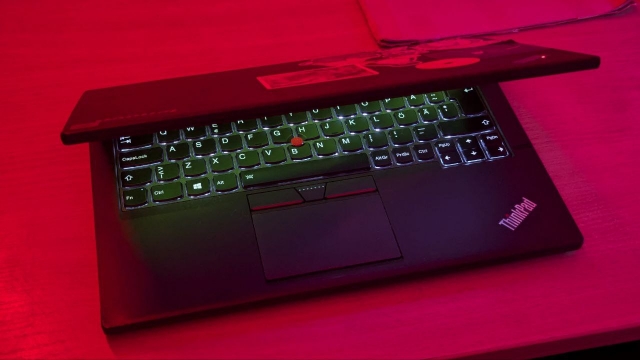
Today I will be writing about a laptop which has undergone relatively quite a few metamorphoses. It is no longer a Lenovo ThinkPad X240 with an Intel i7-4600U processor and 8 GB of DDR3L RAM; the object of this article is X250. This isn’t too big of an upgrade on paper. Relative to X240, this model from Lenovo has only minor changes from the outside and a single generation processor upgrade from the inside, according to Notebookcheck. The only difference between their test model and the one I am sporting currently is the RAM amount - I’ve built myself a machine with 16 GB of RAM. While the 4th generation Intel processors Lenovo ran with for the X240 didn't support 16 GB DDR3L memory at all, the 5th generation chips do actually support that much memory even though the official number remained 8 GB. Perhaps not all processors of X250 do that, but at least 5th gen. ones do. With all these upgrades I’ve got a relatively stable and smooth experience on the go, perfect for school work and occasional gaming or browsing on the go.
Despite these upgrades, the model I used before - X240 - was a decent machine for its age and its price as well. Around four months ago, when I wrote the little article “Refurbished vs New”, I tested laptop’s capabilities in terms of what a typical computer user would face everyday. It wasn’t too hard since most of what I do on my laptop is also browsing, text processing, using programs for learning and some relatively lightweight gaming. Battery configuration consisted of an internal battery with ca. 28% wear and a smaller sized external battery with ca. 23% of wear. Both Linux (Ubuntu) and Windows 10 were used on tests to compare both of their performance and battery life. Tests were made by using the laptop from 100% of capacity for both batteries till the internal battery reached 10%.
Using the laptop on the go wasn’t difficult due to its small size factor. Despite this laptop not trying whatsoever to hide its thickness and sporting as many ports as was possible in 2014, 12.5“ FHD screen helps this laptop maintain a small footprint in one’s backpack or a bag while providing a sharp and relatively broad view perfect for people prioritising ultra-mobility. If you plan on using your laptop casually throughout the day, you will be able to keep your backpack free from a charger and charge it when you’re back at home or while you’re still at work. In addition, the body is really tough, made out of good quality plastic mounted on a magnesium frame, making this laptop very sturdy and not afraid to take a little beating.
Both operating systems lasted ca. 2.5-3 hours when browsing and processing text with mild intensity and listening to music in the background. Using TLP on Ubuntu I was able to squeeze out 25 more minutes when optimizing the performance to enhance battery life when compared to just continuing on with the usual balanced approach to performance vs. battery life. On the other hand, when using Windows no adjustments for the battery life enhancement were made except for a slight dimming of the screen. The computer handled a fresh installation of the OS, drivers, essential programs and using those programs (Firefox, LibreOffice, VLC, etc.) came only with a downside of fans running a little louder than on Ubuntu.
Speaking of loudness: speakers. Lenovo isn’t really known for putting in good speakers into their computers and X240/X250 is no exception. Music and movies playing at 100% volume were still quite quiet, bass is lacking but the mids are alright. Unless you’re planning to use headphones often while listening to music, it’s not going to be a laptop for an awesome audio experience. In silent environments though I found the speakers to be fairly good because they produced very little echo and didn’t bother the neighbors in any way (obviously they didn’t even hear a thing). I have tested X270 and they have better sounding (read: louder) speakers while maintaining the same internal connectors and shapes, so I will try swaping those into my machine and see whether that can be improved. (upd 2024-10-25: i've tested the new set of speakers and compared them to the old ones using a dB meter and there was no difference unfortunately.)
If you plan on picking up a Lenovo laptop from 40 series (X240, T440, etc.), I’d highly recommend the upgraded 50 series since Intel Broadwell processor architecture is much more efficient and chips run a little cooler. Well, that and the trackpad over clunk-pad. If you are still going with the 40 series, i5 and i7 configurations are very valid, running with similar performance when compared to each other. Of course, 8 GB of RAM and an SSD over HDD must be considered for a good computing experience; anything less than than that will be pretty slow and cumbersome. Consider also making a modification to swap out the so-called “clunk-pad” to a better trackpad featured with 50 series onward. You will not only receive a less unstable experience, but also get to enjoy a much quieter work using only the integrated peripherals. If you’re not afraid, check out the article here for a nice overview for the upgrade process.
I am not trying to sell you the idea of ThinkPads being superior machines here; they do look iconic, of course, but the look shouldn't be the only and the biggest reason when considering buying a new laptop, especially a refurbished one. HP, Dell have also manufactured similarly modest and robust looking laptops with sturdy shells in the same era and they can be found for even cheaper; sometimes technical maintenance of these laptops will be easier than of a ThinkPad. In any case, if you are a specific type of nerd (which is wonderful, btw) then you can consider buying something even older than this just for the feel, the experience of it all. It would be interesting to see more vintage laptops unironically being used in real life for the things that these were built for, mainly: portability. Alright, I'm off for another 5 months.